Keep a reusable reply in your Library, with fields for the details that change.
Hi {{name}},

Thanks for reporting the issue. I'm reviewing the details and will send you an update by {{update_by}}.

If anything changes in the meantime, please reply here so I can keep the information together.

Thanks for your patience.
2
Fill in what changes
Choose the saved reply and supply the details for this conversation.
name: Morgan

update_by: Next Tuesday afternoon
3
Paste your reply
Review the personalized message before using it in your work.
Hi Morgan,

Thanks for reporting the issue. I'm reviewing the details and will send you an update by Next Tuesday afternoon.

If anything changes in the meantime, please reply here so I can keep the information together.

Thanks for your patience.
Save once. Personalize the details. Paste your reply.
See the result before you use it.
Go beyond expansion. Ghost previews help you find saved text, check a result and apply it where you work.
Ghost search & apply
Find a reply you have already saved. Search your history, pinned items and Library in a preview at the caret.
Search. Press Ctrl+Shift+S and type a few words.
Choose. Use the arrow keys to preview matches.
Apply. Press Enter to insert, or Esc to cancel.
Free can preview. Pro applies results through Search Cycle, including during the optional 14-day Pro trial.
Search at your caret. A reply draft reads “Hi Morgan,”. Press Ctrl+Shift+S, the default shortcut, to open Ghost search just below the insertion caret. Type UPDATE. The search terms stay outside the draft.
Choose your saved text. The first match is a pinned history entry: “Update: the draft is ready for review.” Press Down to see a history entry: “Update: review is complete. We're ready for the next step.” Press Down again to see a Library item titled “Update follow-up”.
Apply and keep writing. Press Up to return to the history update, then Enter to insert it below the greeting. Esc would cancel the search. The Ghost preview closes and your chosen text is ready in the same reply.
Preview your expansion
Check the resolved text of a Quick Expand shortcut before inserting it. Included in Free.
Clean selected text in place
With Pro, select editable text and press Ctrl+Shift+A. Preview a cleanup action, then press Enter to apply or Esc to cancel.
Get suggestions when you copy
Preview suggestions for supported text, such as removing extra spaces. Free previews; Pro accepts eligible suggestions.
Reuse your cleanup steps
Free includes three saved workflows. Pro adds advanced workflows and app-specific Default Workflows.
More ways to make text work for you.
Explore shortcuts, templates and cleanup workflows. Each guide shows you where to start.
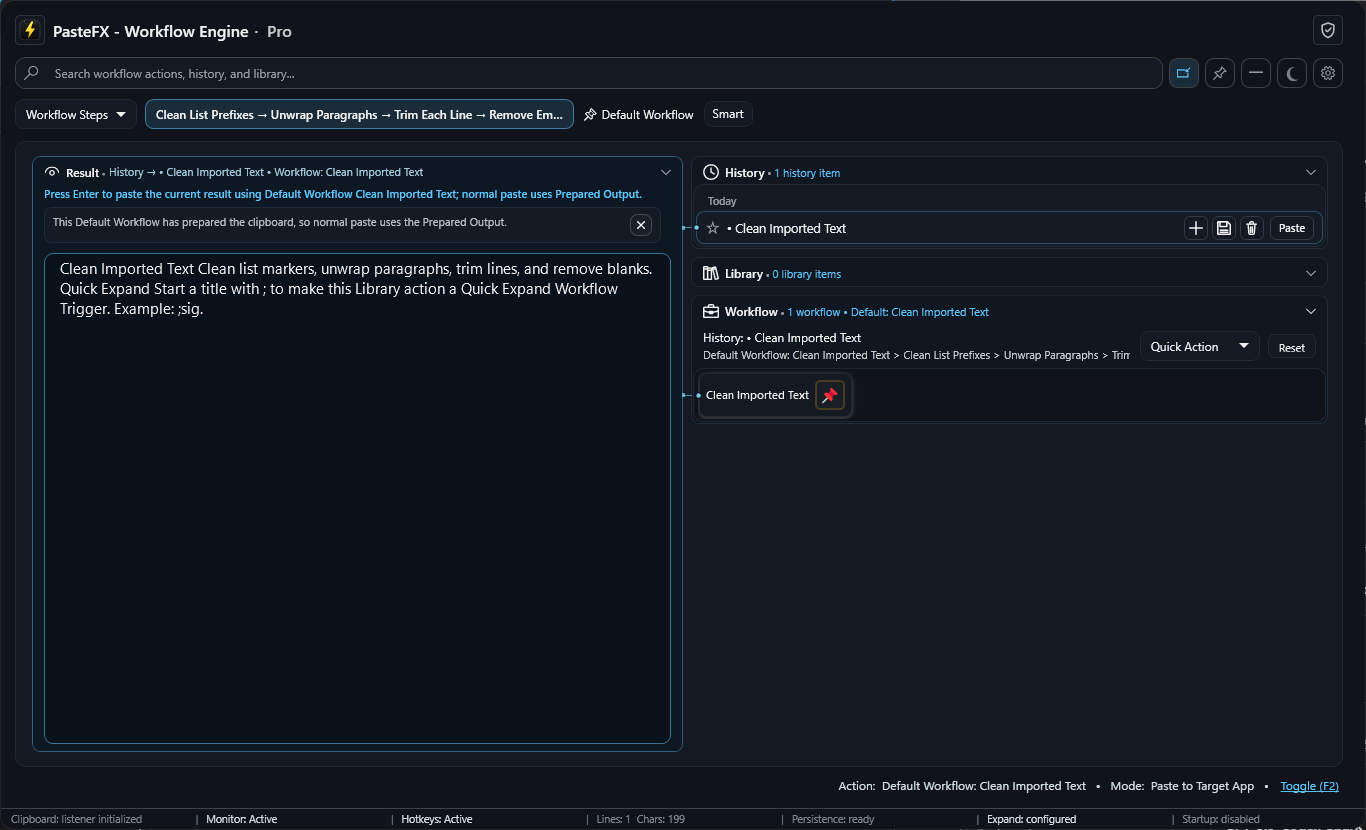
Clean list markers, unwrap paragraphs, trim lines, and remove blanks.
•  Project update
       The revised proposal is ready for review.

   •  Next step
          Send approval by Friday.
2PrepareClean Imported Text
3
Paste · Ctrl+V
Paste clean text automatically
Project update — The revised proposal is ready for review.Next step — Send approval by Friday.
Privacy Statement
Local-only processing: copied text, previews, workflow actions, Quick Expand, Library items, and reusable workflows are processed locally by the app.
No cloud sync: PasteFX does not sync your clipboard history, Library items, prompts, workflows, settings, or Default Workflows to a cloud service.
No telemetry or analytics: PasteFX does not include usage telemetry, analytics SDKs, background reporting, or behavior tracking.
No clipboard uploads: clipboard content is not uploaded, fetched by a web view, or sent to external services by PasteFX.
Frequently asked questions
What is PasteFX?
Save the text you use for follow-ups, updates and support replies. Choose a saved reply, fill in the details, and paste a personalized message with PasteFX for Windows.
Is PasteFX free?
Free includes up to 10 saved Library items. Includes an optional 14-day Pro trial. Free remains available afterward.
Does PasteFX upload my clipboard content?
No clipboard uploads: clipboard content is not uploaded, fetched by a web view, or sent to external services by PasteFX.
Where can I download PasteFX?
PasteFX is available from Microsoft Store. Microsoft provides the signed install and future app updates.
Make your next reply the last one you retype.
Start with 10 saved Library items, fill-in templates and Quick Expand. Free stays available after the optional Pro trial.
 PasteFX